Editable document export · Android and iPhone
Scan to Word on Android and iPhone
Turn a paper handout, printed letter, or imported PDF into a Word document you can edit. OnlyScans exports recognized text as a .docx file on your phone. Standard Word export is free on Android and iPhone; importing a PDF requires Pro.
OnlyScans documentation · Reviewed 21 September 2026
From a scan or PDF to an editable document
Capture a document or import a PDF
Scan your pages in document mode, or import an existing PDF into the library. Use even lighting and keep the text in focus. Word export is available for regular documents; the dedicated ID-card workflow offers PDF and image formats. PDF Import: Pro.
Review the pages
Check the crop, orientation, and page order. Select the OCR language that matches the document. A clear scan gives text recognition a better starting point.
Choose Word Document in export
Open export and choose Word Document. Standard export is free; Enhanced is Pro. On Android, Enhanced layout requires an optional model download of about 27 MB. iPhone uses its built-in on-device layout processing and does not use that Android model pack.
Export, open, and proofread
Tap Export Word and save or share the .docx file. Open it in a Word-compatible editor to correct recognition mistakes and adjust formatting. Check names, numbers, and table cells against the original before sending it.
Standard and Enhanced Word export
Standard · Free
Uses built-in text recognition and layout reconstruction. Recognized text can become editable paragraphs, headings, lists, and tables, with pictures retained where detected. It does not need the optional Enhanced layout model pack.
Enhanced layout · Pro
Enhanced adds on-device layout analysis to help reconstruct headings, tables and pictures. It is a Pro option on both platforms. Android needs its optional layout model pack; iPhone uses the built-in implementation. Always compare the resulting structure with the original.
Choose an export format for the job
| Format | Use it when | What to expect on Android / iOS |
|---|---|---|
| Word (.docx) | You want to rewrite or reuse the text. | Free Standard export; Enhanced layout is Pro. Text and layout may need correction. DOCX export has no password-protection option. |
| The recipient needs a document with fixed pages. | Use a searchable PDF with Pro when you need an OCR text layer. PDF password protection is also a Pro option. | |
| JPEG (.jpg) | You need an image to share or attach. | Image export with adjustable quality. The page remains an image, not editable text. |
| PNG (.png) | You need the scan as a PNG image. | An additional image format on Android / iOS. It does not turn the text into editable paragraphs. |
Check the Word result against your source
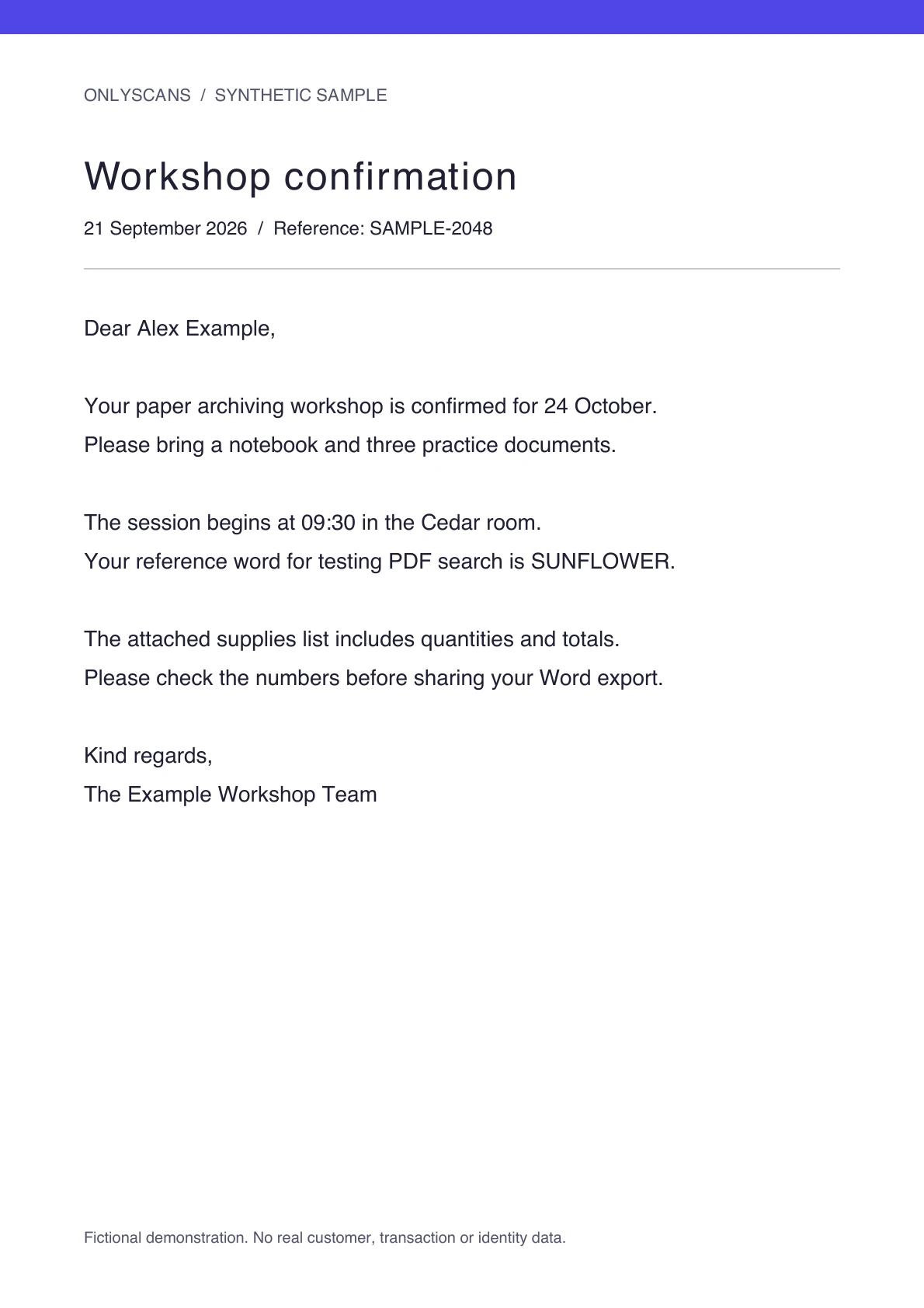
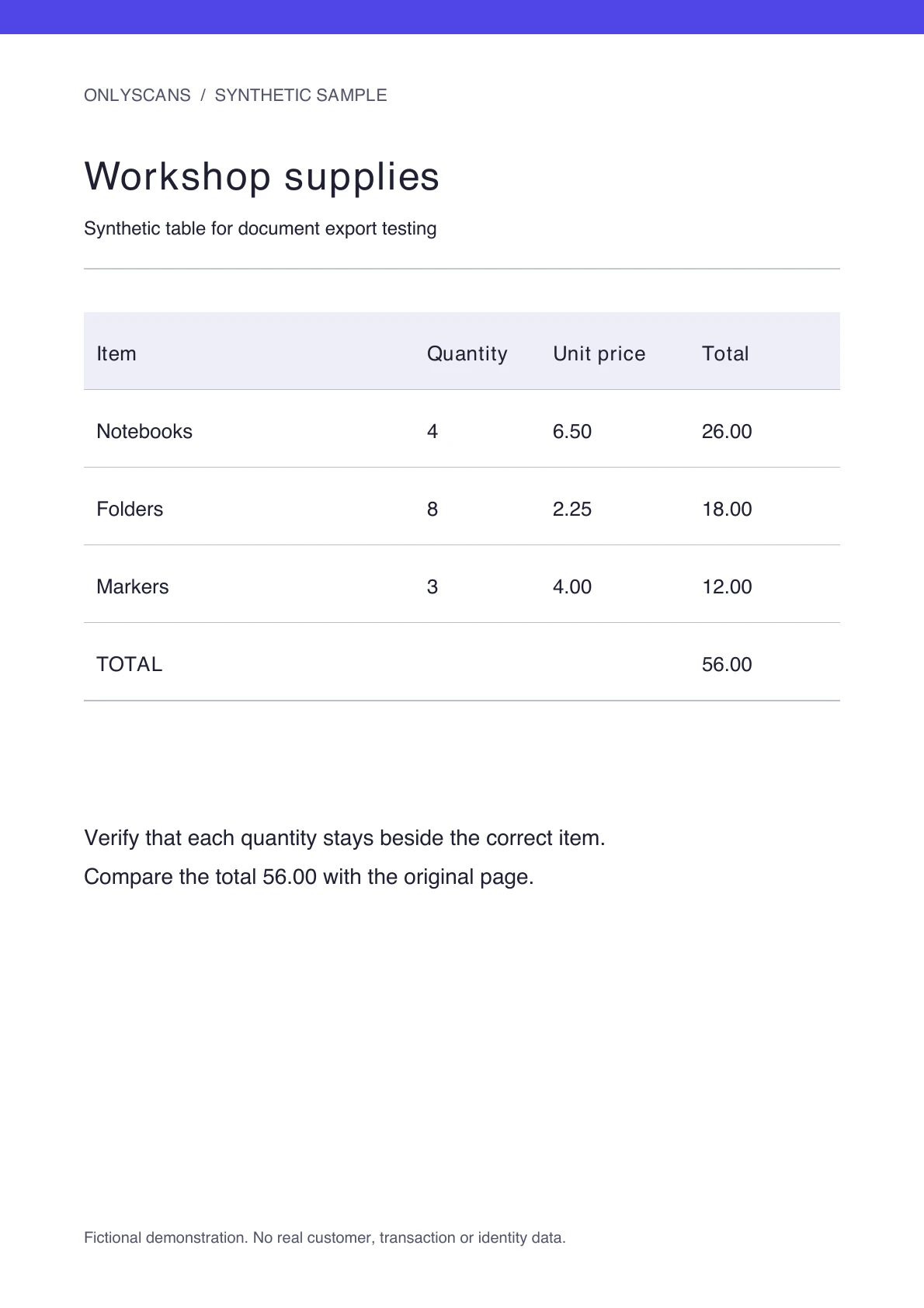
Use the fictional letter and supplies table to compare paragraphs, reading order and table cells after export. Check SUNFLOWER, the time 09:30, quantities 4 / 8 / 3 and the total 56.00. Standard and Enhanced can produce different structures, and either can need correction. These source pages are test inputs, not a promise of identical formatting for every scan.
What stays editable, and what needs review?
DOCX reconstruction is best suited to clear printed text. Complex layouts, small type, handwriting, or poor lighting can produce recognition and formatting errors. Enhanced layout can help with structure, but the result still needs review.
Some rotated or composed pages are preserved as full-page pictures to keep their appearance. Their text may not be editable in Word. Keep the source scan if the original page arrangement matters.
For imported PDFs, OnlyScans can reuse an available text layer when the page structure still matches the source. Otherwise, it recognizes the page images. A searchable PDF and an editable Word document serve different purposes.
Document processing stays on your phone
Text recognition, layout reconstruction, and DOCX creation run locally. Your documents are not uploaded for conversion. Internet access can be needed to install the app, download optional OCR language or layout models, manage purchases, or share a file through a service you choose.
Scan to Word questions
Is scan to Word free?
Standard DOCX export is free in OnlyScans for Android / iOS. Enhanced layout is an optional Pro feature. The separate OCR text-extraction and searchable-PDF features remain Pro features.
Can I convert an existing PDF to Word?
Yes. Import the PDF into OnlyScans on Android / iOS, open export, and choose Word Document. Recognized or available PDF text can become editable content, but complex layouts and pages preserved as pictures may need extra work. PDF Import: Pro.
Does Word export work offline?
Word export runs on your device. Set up the app and required OCR languages before working offline. Capture, editing and recognition use local processing. Internet may be needed for installation, optional language or Android layout-model downloads, updates, purchases and purchase restoration through Google Play or Apple. Test your intended language and export settings before you lose connectivity.
Can I export an ID card as DOCX?
Word is not offered in the dedicated ID-card export workflow. Use PDF, JPEG, or PNG for ID documents. Word export is for regular scanned documents and imported PDFs.
Can I password-protect the Word file during export?
No. The password option applies to PDF export. OnlyScans does not encrypt DOCX exports.
Is this Word-export workflow available on iPhone?
Yes. Standard Word export, Enhanced export and PNG are available on Android and iPhone. Controls and setup can differ. PDF import is a Pro feature on iPhone; the separate OCR text-extraction and searchable-PDF tools also require Pro.